Last Update on December 23, 2025
In 2025, virtual reality is no longer just a playground for gamers. It has transformed into a mature ecosystem where productivity, creativity, well-being, and exploration converge. With the arrival of the Meta Quest 3, the Apple Vision Pro, and the improvement of color passthrough, the boundary between virtual reality (VR) and mixed reality (MR) is blurring to give birth to a new era: that of spatial computing.
The VR and MR applications available today push the limits of how we work, learn, train, and interact with the digital world. Whether you’re looking to turn your headset into an infinite office, meditate in psychedelic environments, or paint in three dimensions, this ecosystem now offers concrete answers to real needs.
This guide presents the 20 best virtual and mixed reality applications in 2025, organized by usage category. From immersive productivity to artistic experiences, fitness, and collaborative spaces, these tools show what VR can truly bring to your daily life.
The Evolution of VR and MR Apps in 2025: What Has Changed
The year 2025 marks a decisive turning point in the ecosystem of immersive applications. Unlike previous years dominated by gaming, the market has diversified into professional and daily uses. According to Wikipedia, virtual reality is defined as a technology that allows for the simulation of physical presence in real or imaginary environments.
Three major developments characterize 2025:
- The rise of spatial computing: With MR headsets like the Quest 3 and Vision Pro, applications now integrate the real world into the virtual experience thanks to high-resolution color passthrough.
- Generative AI integration: Many applications now feature AI assistants for content creation, real-time translation, or workflow optimization.
- Ecosystem maturity: Apple’s visionOS and Meta’s Horizon OS offer structured app stores with high quality standards.
Users are no longer just looking for entertainment, but for tools that replace or complement their traditional equipment. The VR headset is becoming a credible alternative to the computer screen, the gym, or the physical meeting space.
Productivity and the Infinite Office: The Era of Spatial Computing
Productivity in VR has seen an explosion in 2025. Virtual desktop applications now allow for the replacement of multiple physical screens with unlimited floating screens in 3D space. This category represents one of the strongest growths in the market.
Immersed: The Ultimate Virtual Office
Immersed has established itself as the benchmark for working in VR. The app allows you to create up to 5 virtual screens around you, customize your workspace (coffee shop, mountain, space station), and collaborate with other users in shared spaces.
New features for 2025 include improved hand tracking for typing on a virtual keyboard with precision, integration of AI assistants for automatic note-taking, and compatibility with major productivity tools (Slack, Notion, Google Workspace).
Available on: Meta Quest 2/3/Pro, Pico 4, Apple Vision Pro, SteamVR
Business model: Free with limitations, Pro subscription at €15/month
Ideal for: Digital nomads, developers, and designers who want a multi-screen setup without physical constraints
Virtual Desktop: The PCVR Gateway
Virtual Desktop remains essential for streaming your PC to your VR headset. Beyond gaming, the app excels at accessing professional software (Adobe Suite, 3D software) with minimal latency.
In 2025, Virtual Desktop offers a Mixed Reality mode allowing you to see your real environment while working on your virtual screens, a particularly useful feature for keeping an eye on your physical space.
Available on: Meta Quest 2/3/Pro, Pico 4
Price: €19.99 (one-time purchase)
Ideal for: Creatives who need to access heavy software from their standalone headset
Horizon Workrooms: Spatial Collaboration

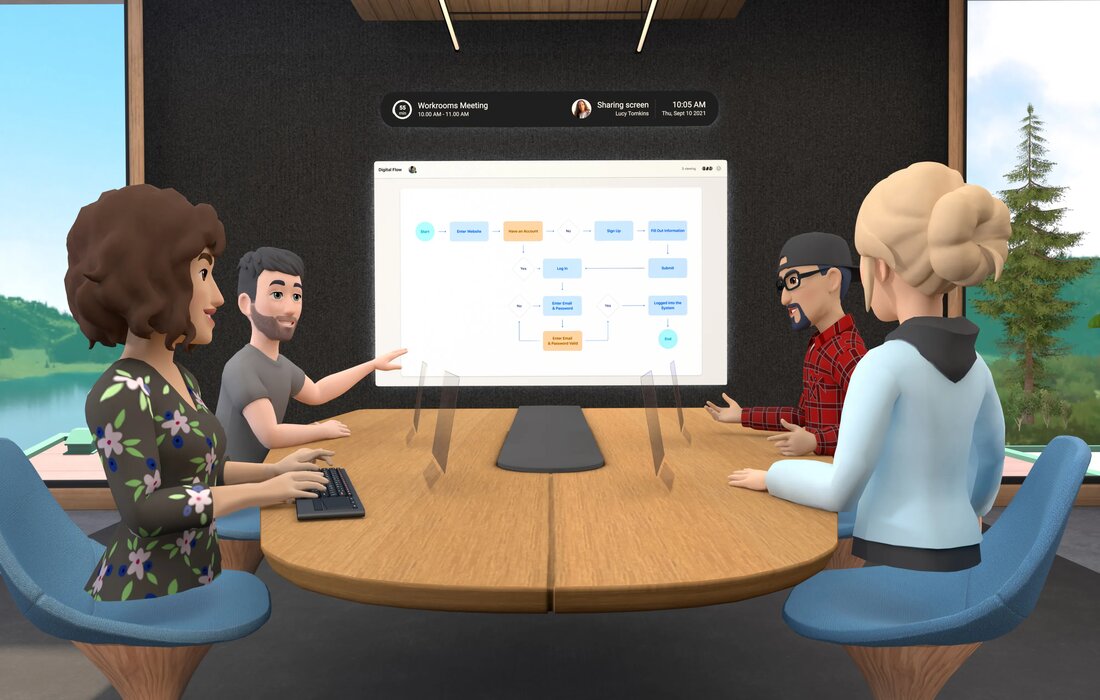
Horizon Workrooms is Meta’s answer to remote collaboration. It allows teams to meet in a virtual office equipped with interactive whiteboards, expressive avatars, and realistic spatial audio. You can draw, annotate documents, and truly feel like you are with others.
The app syncs with your computer, allowing you to import files, share your screen, and type on a physical keyboard thanks to real-world tracking. It is surprisingly functional once you get past the cartoonish avatars.
In 2025, Horizon Workrooms now integrates with Slack, Microsoft Teams, and Google Meet, allowing for hybrid meetings where some participants are in VR and others are on traditional screens.
Available on: Meta Quest 2/3/Pro
Price: Free
Ideal for: Distributed teams, tech startups, and corporate training
Spatial: 3D Galleries and Collaborative Spaces
Spatial combines productivity and creativity by offering customizable workspaces where you can display 3D models, images, and videos, and collaborate in real-time. The app is particularly popular with designers, architects, and creative teams.
The 2025 version integrates AI tools to generate environments from text prompts and directly import files from Figma, Miro, or Blender.
Available on: Meta Quest, Apple Vision Pro, web browsers
Price: Free with limitations, Pro plans starting at €20/month
Ideal for: Design teams, creative agencies, and immersive client presentations
Artistic Creation and 3D Design: The Essentials
VR has revolutionized artistic creation by allowing users to paint, sculpt, and design in a three-dimensional space. These apps transform your headset into a limitless digital studio.
Tilt Brush / Open Brush: 3D Painting
Tilt Brush, now maintained as open source under the name Open Brush, remains the benchmark for spatial painting. You can create three-dimensional works with brushes that simulate fire, stars, smoke, or glowing neon.
The app offers simple but powerful tools: selection, symmetry, duplication, and export to other 3D software. In 2025, Open Brush integrates collaborative features allowing multiple artists to work simultaneously on the same virtual canvas.
Available on: Meta Quest, SteamVR, PC VR headsets
Price: Free (Open Brush)
Ideal for: Digital artists, animators, creative therapy, and art education
Gravity Sketch: Industrial Design and 3D Conception
Gravity Sketch is aimed at professional designers who want to design products, vehicles, or environments directly in 3D. The app allows for the creation of complex shapes with millimeter precision and export to traditional CAD software.
Major brands like Ford, Adidas, and Volkswagen use Gravity Sketch in their design process. The tool allows for moving from an idea to a 3D prototype in a few hours instead of several days.
Available on: Meta Quest 2/3/Pro, SteamVR
Price: Free for personal use, enterprise licenses available
Ideal for: Industrial designers, engineers, and architectural studios
Medium: Immersive Digital Sculpture
Adobe’s Medium transforms you into a digital sculptor. The app offers virtual clay tools that you can model, smooth, paint, and texture with your hands. It is the VR equivalent of ZBrush but with an intuitive and gestural approach.
In 2025, Medium integrates perfectly with Adobe Substance 3D and allows for direct export to Unreal Engine or Unity to create assets for video games or VR experiences.
Available on: Meta Quest 2/3/Pro, SteamVR
Price: €29.99 (one-time purchase)
Ideal for: Digital sculptors, game creators, and 3D artists
Social and Metaverse: Where to Meet in 2025
Social spaces in VR have matured. In 2025, they are no longer just 3D chatrooms but real digital living spaces where people meet, create, and share experiences.
VRChat: The Community Metaverse
VRChat remains the largest social space in VR with millions of users and thousands of worlds created by the community. You can embody any avatar (human, animal, fantasy creature), explore infinite universes, and participate in live events.
What distinguishes VRChat in 2025 is its flourishing creative economy. Creators can sell avatars, worlds, and accessories directly within the app, creating a true economic ecosystem.
Available on: Meta Quest, SteamVR, PC (desktop mode)
Price: Free, VRChat+ subscription at €9.99/month for premium features
Ideal for: Socializing, virtual events, and creative identity expression
Rec Room: Creativity and Social Games
Rec Room combines social space and a game creation platform. You can play thousands of mini-games created by the community, participate in cooperative quests, or create your own experiences without coding.
The app is particularly popular with young adults and offers active moderation to maintain a healthy environment. In 2025, Rec Room introduced AI-assisted creation tools allowing for the generation of environments from text descriptions.
Available on: Meta Quest, PlayStation VR2, SteamVR, iOS, Android
Price: Free with in-app purchases
Ideal for: Families, friend groups, and beginner creators
Bigscreen VR: Shared Virtual Cinema

Bigscreen VR transforms your headset into a shared digital cinema. You can watch movies by renting recent titles, participate in public screenings, or create private rooms for a movie night with geographically dispersed friends.
The app manages private or public rooms. You can stream your own files, join live events (concerts, conferences), or simply hang out with friends in an immersive environment. Spatial audio truly makes you feel like you are sitting next to someone.
In 2025, Bigscreen offers virtual screens up to 200 inches with HDR support and Dolby Atmos audio, providing visual quality comparable to the best physical cinemas.
Available on: Meta Quest, SteamVR, PC VR headsets
Price: Free, movie rentals starting at €3.99
Ideal for: Virtual movie nights, long-distance couples, and replacing your TV screen
Education and Training: Learning in Immersion
Education in VR has proven its effectiveness in 2025. Studies show that information retention in an immersive environment is 75% higher compared to traditional methods.
Google Earth VR: Immersive Geography
Google Earth VR remains one of the most breathtaking experiences in virtual reality. It transforms how we explore the world by allowing you to fly over cities, climb Everest, or stroll through the streets of Tokyo, all without leaving your living room.
Originally launched as a tech demo, it has transformed into a powerful educational and recreational tool. You can zoom in on real places, visit monuments, revisit your old neighborhood, or explore places you might never see in person.
What makes it unique in 2025 is its ability to combine function and wonder. Teachers use it for immersive geography lessons, historians to contextualize events, and travelers to prepare for their destinations.
Available on: SteamVR (compatible with HTC Vive, Valve Index, and Oculus Rift)
Price: Free
Ideal for: Virtual tourism, teaching geography, and exploring the world from home
Wander: Social Street View
Wander takes the concept of Google Earth VR but adds a social dimension. You can explore the world with up to 5 friends simultaneously, chat in spatial audio, and share the discovery of places together.
The app also integrates Wikipedia, allowing you to learn about the places you visit directly in VR. It has become a popular tool for teachers to organize virtual school trips.
Available on: Meta Quest 2/3
Price: €9.99 (one-time purchase)
Ideal for: Friend groups, geography classes, and contextual language learning
National Geographic Explore VR: Educational Adventures
National Geographic Explore VR transports you on guided expeditions to Antarctica, Machu Picchu, or the jungles of South America. Unlike simple 360° videos, you can interact with the environment: take photos, collect samples, and solve puzzles.
It is an immersive narrative experience that combines education and adventure. Teachers use the app to supplement their natural science and history classes.
Available on: Meta Quest 2/3
Price: Free
Ideal for: Families, science education, and nature enthusiasts
Engage: Professional Training in VR
Engage is a professional training and events platform in VR. Companies like PwC, Walmart, and Verizon use it to train their employees in realistic simulated environments.
The app allows for the creation of interactive presentations, organizing virtual conferences, and tracking learner performance. In 2025, Engage offers recognized certifications in several industries.
Available on: Meta Quest, SteamVR, Pico 4
Price: Free for individual use, enterprise licenses on quote
Ideal for: Professional training, conferences, and higher education
Fitness and Well-being: Moving in VR
Fitness in VR has exploded in popularity. Applications transform exercise into a game, making training addictive rather than a chore.
FitXR: Virtual Gym
FitXR is a fitness app that disguises training as a VR game, but make no mistake: the sessions are intense. The app offers rhythmic boxing, dance, HIIT, and combat, with new classes added daily.
Virtual instructors guide you through 10 to 60-minute sessions. You can track your calories burned, your heart rate (if your headset is compatible), and your progress over time. The community is active with leaderboards and monthly challenges.
In 2025, FitXR uses AI to automatically adapt the intensity of exercises to your level and suggest personalized programs based on your goals.
Available on: Meta Quest 2/3/Pro
Price: Monthly subscription at €9.99 or annual at €59.99
Ideal for: Replacing a gym membership, doing cardio at home, and working out while having fun
Supernatural: Guided Fitness in Breathtaking Landscapes
Supernatural combines fitness and travel by placing your workout sessions in stunning real-world environments filmed in 360°: Bali beaches, Iceland mountains, New Zealand forests.
The app offers guided classes by certified coaches with licensed music playlists. Every movement is choreographed to the music, creating an immersive experience close to a boutique fitness class.
Available on: Meta Quest 2/3
Price: Monthly subscription at €19.99
Ideal for: Guided fitness enthusiasts and those who want to travel while working out
Les Mills Bodycombat: Immersive Boxing
Les Mills Bodycombat brings the famous Les Mills fitness method to VR. You box against rhythmic targets in futuristic environments, guided by virtual instructors.
The app strictly follows the Les Mills method with structured programs and calibrated progression. It is less game-like than other VR fitness apps but more effective for a true cardio workout.
Available on: Meta Quest 2/3
Price: Monthly subscription at €14.99
Ideal for: Serious fitness practitioners and fans of the Les Mills method
TRIPP: Psychedelic Meditation
TRIPP is not a fitness app but a mental well-being app. It is a guided journey toward mindfulness through immersive visuals, spatial audio, and breathing exercises. Imagine meditating in a digital art gallery designed to calm your nervous system.
The sessions are short and guided, with visual environments that react to your breathing and focus. It’s not just sitting and doing nothing; it’s being active in relaxation.
In 2025, TRIPP continues to enrich its scientifically validated content with new daily experiences, personalized mood tracking, and tools to manage anxiety and stress.
Available on: Meta Quest, PlayStation VR2
Price: Monthly subscription at €7.99
Ideal for: Stress management, guided meditation, and improving sleep
Exploration and Discovery: Traveling Without Moving
These apps transport you to inaccessible places or let you discover the world from a new angle.
YouTube VR: Unlimited 360° Content

YouTube VR brings the entire YouTube universe into your headset, including thousands of 360° videos and native VR content. It’s not just watching a video on a floating screen; it’s diving into music videos, exploring virtual tours, or attending a concert from your couch.
The app is fully synced with your YouTube account, so you find your subscriptions, playlists, and history. You can browse, search, comment, and like videos with controls adapted for VR.
In 2025, content creators are publishing immersive experiences more than ever: 360° travel vlogs, nature documentaries, VR tutorials, and interactive storytelling. YouTube VR remains one of the most accessible gateways to this universe.
Available on: Meta Quest, SteamVR (limited support), Android VR platforms
Price: Free
Ideal for: Watching videos in relaxation mode, exploring 360° content, and discovering the internet in VR
Mission: ISS: Visit the International Space Station
Mission: ISS allows you to float in the International Space Station and perform astronaut tasks. It is a faithful recreation of the ISS developed in partnership with NASA.
You can explore every module, handle scientific equipment, and even perform an extravehicular activity in space. It is one of the most impressive educational experiences in VR.
Available on: Meta Quest 2/3, SteamVR
Price: Free
Ideal for: Space enthusiasts, science education, and living the astronaut dream
The Body VR: A Journey Inside the Human Body
The Body VR miniaturizes you to explore the human body from the inside. You travel through the bloodstream, observe red blood cells carrying oxygen, and understand biological mechanisms in a visceral way.
It is an extraordinary pedagogical tool for medical or biology students, but also a fascinating experience for anyone curious about how our organism works.
Available on: Meta Quest, SteamVR
Price: Free
Ideal for: Biology education, medical students, and science popularization
Non-Artistic Creativity Applications
ShapesXR: Prototyping XR Interfaces and Experiences
ShapesXR allows UX/UI designers to prototype spatial interfaces and experiences directly in VR. You can create 3D mockups, test gestural interactions, and collaborate in real-time with your team.
The app is particularly useful for designing VR or MR applications, as you can directly experience ergonomics and scale in the target environment.
Available on: Meta Quest, Apple Vision Pro
Price: Free for individual use, Pro plans starting at €25/month
Ideal for: UX/UI designers, product managers, and XR teams
MakeVR: Intuitive 3D Modeling
MakeVR is a 3D modeling tool designed to be accessible without technical training. You build objects by assembling geometric primitives (cubes, spheres, cylinders) and then modifying them with simple tools.
The app allows for export to 3D printers, making it a complete tool for moving from an idea to a physical object. Schools use it to teach 3D design to children.
Available on: SteamVR, Oculus Rift
Price: €19.99
Ideal for: 3D beginners, makers, and design education
B2B Applications and Professional Training
The B2B sector represents the strongest growth in the VR market in 2025. Companies are investing heavily in immersive training and spatial collaboration.
VIVE Sync: Professional Meetings in VR
HTC’s VIVE Sync is a professional meeting platform in VR focused on security and enterprise features. Unlike Horizon Workrooms, VIVE Sync targets large organizations with strict compliance needs.
The app offers realistic avatars, customizable meeting rooms, integration with corporate tools (SSO, Active Directory), and advanced 3D presentation features.
Available on: VIVE Focus 3, VIVE XR Elite, SteamVR
Price: Free for up to 10 participants, enterprise licenses on quote
Ideal for: Large companies, sensitive training, and design reviews
Strivr: VR Training for Industry
Strivr specializes in immersive training for industrial sectors: retail, hospitality, manufacturing. Companies like Walmart, Verizon, and BMW use it to train their employees in complex or dangerous procedures in a safe environment.
The platform allows for the creation of custom scenarios, tracking learner performance, and obtaining detailed analytics on training effectiveness.
Available on: Meta Quest (enterprise deployment), Pico Neo 3 Pro
Price: Enterprise licenses on quote
Ideal for: Employee training, risk situation simulation, and onboarding
How to Choose Your Apps Based on Your Headset in 2025
The choice of applications depends greatly on your hardware ecosystem. Here is a guide by platform:
Meta Quest 2/3/Pro: The Most Extensive Ecosystem
With the Meta Quest Store, you access the largest catalog of VR and MR applications. The Quest 3 benefits from high-resolution color passthrough, making mixed reality applications particularly convincing.
Essential apps: Immersed, FitXR, Horizon Workrooms, YouTube VR, Tilt Brush, Wander
Strength: Balance between price and quality, standalone (no PC needed)
Limitation: Fewer professional apps than Vision Pro
Apple Vision Pro: Productivity and Premium Quality
The Vision Pro excels in spatial productivity and cinematic quality experiences. visionOS offers native apps optimized for precise hand tracking and eye tracking.
Essential apps: Safari in spatial computing, Freeform for collaboration, Disney+ with exclusive immersive content, Spatial for 3D galleries
Strength: Perfect integration with the Apple ecosystem, unmatched display quality
Limitation: Still limited catalog, high price (€3,499)
PCVR (SteamVR): Power and Historical Library
If you have a PC VR headset (Valve Index, HTC Vive, Varjo), Steam remains the benchmark with thousands of apps and games. The power of a PC allows for graphically richer experiences.
Essential apps: Google Earth VR, Virtual Desktop, Gravity Sketch, Medium, all SteamVR titles
Strength: Maximum graphic power, historical library, modding
Limitation: Setup bulk, high total price (PC + headset)
Pico 4: The European Alternative
ByteDance’s Pico 4 is gaining ground in Europe with excellent value for money and a growing catalog on the Pico Store.
Essential apps: Virtual Desktop, FitXR, Immersed, compatible SideQuest apps
Strength: Competitive price, excellent comfort, alternative to Meta
Limitation: Less extensive catalog than Quest, uncertainties about long-term support
Free vs. Paid Apps: What to Choose?
In 2025, the business model for VR apps has diversified:
Best Free Apps
- Google Earth VR: Free global exploration
- YouTube VR: Unlimited 360° content
- Horizon Workrooms: Professional collaboration
- VRChat: Socialization and community creation
- Mission: ISS: Space education
- Rec Room: Social games and creation
Paid Apps Worth the Investment
- Virtual Desktop (€19.99): Essential for streaming your PC
- Wander (€9.99): Improved social Google Earth
- Medium (€29.99): Professional 3D sculpture
Justified Monthly Subscriptions
- Immersed Pro (€15/month): If you work seriously in VR
- FitXR (€9.99/month): Replaces a gym membership
- VRChat+ (€9.99/month): If you spend a lot of time on the platform
The Impact of Generative AI in VR Apps 2025
Generative artificial intelligence has revolutionized several categories of VR apps in 2025:
AI-Assisted Creation
Apps like Spatial and ShapesXR now integrate environment generators based on text prompts. You can create a futuristic virtual office, a mystical forest, or a Parisian café simply by describing what you want.
Generative Avatars
Ready Player Me uses AI to generate photorealistic avatars from a simple photo. These avatars can be used in most social VR apps, creating continuity of digital identity.
Real-Time Translation and Accessibility
Social apps like VRChat and Horizon Worlds now integrate real-time voice translation, allowing for fluid conversations between people who do not speak the same language.
Intelligent Assistance
Immersed offers an AI assistant that can automatically take notes during your VR meetings, generate summaries, and even suggest actions based on your conversations.
Cross-Platform Compatibility and SideQuest
A frequent question in 2025: can you use Android apps on Meta Quest?
SideQuest: The Alternative Library
SideQuest remains the essential platform for accessing experimental apps, betas, and community projects not available on official stores. The installation process has simplified in 2025 with a dedicated store accessible directly from the Quest.
Thousands of free and paid experiences are available there, often more innovative than mainstream apps.
Android Apps in VR
Technically possible via emulators, the experience remains limited. Traditional Android apps are not optimized for VR interaction (no controller support, flat interface). A few exceptions exist for video streaming or media playback.
Apple Vision Pro Exclusive Apps in 2025
The Vision Pro has launched several exclusive experiences fully exploiting its unique capabilities:
Encounter Dinosaurs
An immersive narrative experience developed by the studio behind the award-winning console game. You observe life-sized dinosaurs in your living room thanks to the Vision Pro’s precise passthrough.
Apple TV+ Immersive Content
Apple produces exclusive immersive narrative content for the Vision Pro, including 180° nature documentaries with exceptional image quality.
Freeform Spatial
The VR version of Apple’s collaborative app allows for the creation of infinite whiteboards in 3D space, with perfect synchronization with iPhone and iPad.
Resource Consumption: Battery and Performance
An often-overlooked aspect when choosing apps: their impact on battery life and performance.
Light Apps (3+ hours of battery life)
- Immersed (mostly text mode)
- Wander
- YouTube VR (2D video mode)
- TRIPP
Medium Apps (2-2.5 hours)
- Horizon Workrooms
- VRChat (depending on world complexity)
- Google Earth VR
Intensive Apps (1-1.5 hours)
- FitXR and fitness apps (processor + intensive tracking)
- Medium and Gravity Sketch (complex 3D rendering)
- Bigscreen with high-quality streaming
2025 Tip: Most headsets now support playing while charging, allowing for extended sessions for productivity apps.
FAQ: Frequently Asked Questions about VR Apps 2025
What are the best free VR apps in 2025?
The best free VR apps include Google Earth VR for global exploration, YouTube VR for 360° content, Horizon Workrooms for professional collaboration, VRChat for socialization, Rec Room for social games, and Mission: ISS for space education. These apps offer complete experiences without requiring a purchase.
Can you use Android apps on Meta Quest?
The Meta Quest uses a modified version of Android but does not directly access the Google Play Store. You can install some Android apps via SideQuest or APKs, but the experience is limited as these apps are not optimized for VR (no controller support, flat interface). Prefer native Quest Store or SideQuest apps for an optimal experience.
Which apps are exclusive to Apple Vision Pro?
The Vision Pro features exclusives like Encounter Dinosaurs (MR narrative experience), Apple TV+ immersive content (cinematic quality 180° nature documentaries), Freeform Spatial (3D collaboration integrated into the Apple ecosystem), and various native visionOS apps optimizing the headset’s precise hand and eye tracking.
Are VR apps compatible with mixed reality?
This depends on the app and the headset. On Meta Quest 3 and Vision Pro, many VR apps can activate a passthrough mode to integrate the real world. Apps designed specifically for MR (like Horizon Workrooms in mixed mode or Apple Vision Pro experiences) offer native integration. Pure VR headsets (without color passthrough) do not support mixed reality.
Conclusion: Building Your VR App Ecosystem in 2025
The landscape of virtual and mixed reality applications in 2025 is rich, diverse, and mature. Whether you’re looking to increase your productivity with an infinite virtual office, maintain your fitness with addictive fitness apps, create works of art in three dimensions, or simply explore the world from your living room, proven solutions now exist.
The recommended approach to building your app ecosystem:
1. Identify your primary use: Productivity, fitness, creation, socialization, or exploration?
2. Start with the free ones: Google Earth VR, YouTube VR, Horizon Workrooms, and VRChat already offer hours of experiences without investment.
3. Invest in the fundamentals: Virtual Desktop (if you have a PC), Wander (for social exploration), Immersed Pro (if you work in VR).
4. Test subscriptions: FitXR, TRIPP, or Supernatural are worth a one-month trial to evaluate their value.
5. Explore SideQuest: Hundreds of free and innovative experiences await there.
The virtual reality of 2025 is no longer a niche technology. It is a versatile tool that integrates into the daily lives of millions of users. The apps presented in this guide represent the best of what this technology can offer today, but the ecosystem is evolving rapidly. Check back regularly to discover the new gems transforming how we interact with the digital world.