Last Update on December 24, 2025
In 2025, Horizon Worlds has established itself as the leading social virtual reality platform developed by Meta. This free immersive experience transforms the way we interact, create, and play in the VR metaverse. Accessible on Meta Quest 2, Quest 3, and Quest Pro, Horizon Worlds now boasts over 500,000 monthly active users and offers thousands of community-created worlds. This complete guide will walk you through your first steps to advanced creation and the monetization of your own virtual experiences.
What is Horizon Worlds in 2025?
Horizon Worlds is a social virtual reality platform that merges exploration, creation, and community interaction. Officially launched in December 2021, the platform underwent a major evolution in 2025 with the introduction of revolutionary features: full-body avatars with legs, an advanced monetization system for creators, cross-platform compatibility with the Horizon mobile app, and a simplified visual scripting engine.
Unlike traditional VR games, Horizon Worlds positions itself as a persistent social space where users are not just players, but creators, explorers, and entrepreneurs. The platform stands out for being entirely free and having an open ecosystem that allows anyone to build their own worlds without programming skills.
In 2025, Meta integrated partnerships with major brands (Nike, Adidas, Coca-Cola) that create branded spaces, transforming Horizon Worlds into a true virtual cultural hub where concerts, sporting events, and art exhibitions take place.
How to Access Horizon Worlds: Quest 3, Mobile, and Web
System Requirements and Compatibility
To access Horizon Worlds in 2025, you have several options depending on your hardware:
Full VR Experience (Recommended):
- Meta Quest 3: Optimal performance with improved graphics and precise tracking ($499/€549)
- Meta Quest Pro: Premium experience with eye-tracking and realistic facial expressions ($999/€1,199)
- Meta Quest 2: Affordable but perfectly functional option ($249/€299)
New for 2025 – Mobile and Web Access: Meta has rolled out the Horizon Mobile app available on iOS and Android, allowing you to explore worlds in 2D mode, participate in voice chats, and manage your creations from your smartphone. The Horizon.meta.com web interface offers similar features for browsers.
Installation Steps and First Steps
On Meta Quest (VR):
- Create or log in to your Meta account (mandatory since 2023)
- In the Quest library, search for ‘Horizon Worlds’ and download the app for free (approx. 2.5 GB)
- Launch the app and accept the terms of use
- Follow the orientation tutorial guided by the Meta virtual assistant (about 10 minutes)
- Customize your avatar with new 2025 options including full-body morphology
On Mobile/Web: Download the Horizon app from the App Store or Google Play, log in with your Meta credentials, and explore worlds in third-person view with simplified touch controls.
Important: Horizon Worlds is only accessible to users aged 18 and over in most countries (13-17 with parental authorization in the US and Canada).
Creating and Customizing Your Meta Avatar: 2025 New Features
One of the major developments in 2025 concerns the avatar system. No more floating characters without legs! Meta has deployed full-body avatars with precise movement tracking thanks to predictive AI algorithms.
Advanced Customization Options
The 2025 avatar creator offers:
- Realistic Morphology: Adjustment of height, build, and proportions with 50+ customization sliders
- Expanded Clothing Library: Over 2,000 items of clothing, accessories, and styles (free and premium)
- Dynamic Facial Expressions: On Quest Pro, your avatar reproduces your real expressions via eye-tracking and face-tracking
- Branded Accessories: Official collections from Nike, Adidas, and Gucci available via in-app purchases
- Emotes and Gestures: A library of 100+ animations for non-verbal communication
To access the avatar creator, open the main menu (Meta button) and select ‘Customize Avatar’. Changes are synced instantly across all Horizon worlds.
The Best Worlds You Must Visit in 2025
With over 10,000 community-created worlds, here is a selection of must-see experiences in 2025, sorted by category:
Social Worlds and Hangouts
1. Meta Central Plaza: The official social hub redesigned in 2025, a meeting point with integrated mini-games, giant screens for live events, and seasonal themed zones.
2. VR Lounge Café: A cozy space with virtual pool tables, karaoke, and private rooms for groups. Ideal for socializing in a relaxed atmosphere.
3. Sunset City Rooftop: An urban terrace with panoramic views, scheduled DJ sets, and chill-out zones. One of the most popular spots in the evening.
Immersive Experiences and Adventures
1. Super Rumble Arena: The flagship multiplayer game of Horizon Worlds, a cartoonish battle royale with platforming mechanics. Weekly tournaments with rewards.
2. Citadel Defense: A cooperative tower defense where up to 8 players defend their fortress against waves of enemies. Strategy and coordination are essential.
3. Mystic Quest Chronicles: A narrative RPG with quests, dungeon exploration, and a progression system. Over 15 hours of community-created content.
4. Zero Gravity Station: A space simulation where you move in weightlessness within an orbital station, featuring scientific puzzles and spectacular views of Earth.
Educational and Cultural Experiences
1. MAV Virtual Art Museum: A gallery showcasing works by digital artists, rotating exhibitions, and monthly openings with the creators.
2. Immersive Planetarium: A journey through the solar system with astronomical explanations and real-scale visualizations.
3. VR History: Historical reconstructions allowing you to visit Ancient Rome, the Egypt of the Pharaohs, or the Florentine Renaissance.
To discover these worlds, use the search function in the main menu or check the ‘Trending’ rankings updated daily. You can also join your friends directly in their favorite worlds via the social interface.
Becoming a Creator: Building Tools and Scripting in 2025
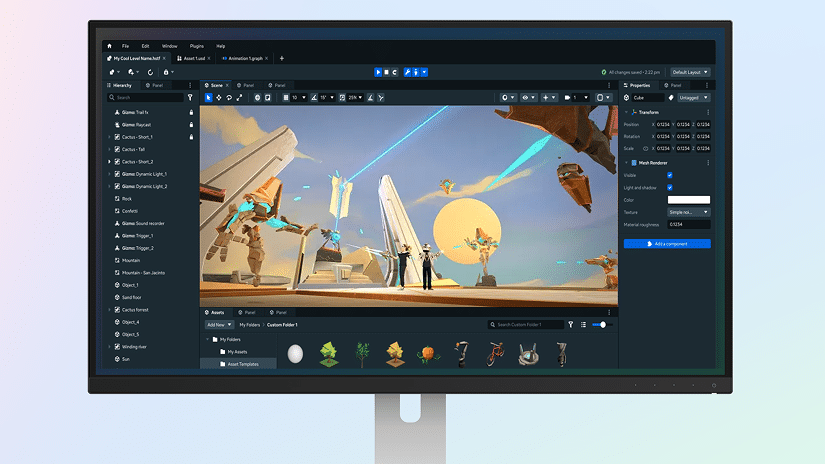
One of the strengths of Horizon Worlds lies in its accessible creation tools. In 2025, Meta significantly improved the World Builder, making the creation of complex worlds possible without a single line of code.
Creator Mode: Interface and Features
To access creator mode, open the main menu and select ‘Create’ then ‘New World’. You have several starting templates: tropical island, urban environment, indoor space, blank terrain.
Available Building Tools:
- Asset Library: 5,000+ prefabricated objects (furniture, vegetation, structures, effects)
- Terrain Modeler: Sculpt hills, valleys, and rivers with intuitive painting tools
- Advanced Lighting System: Dynamic light sources, day/night cycles, and atmospheric effects
- Interactive Physics: Objects with gravity, collisions, and customizable material properties
- Spatial Audio: Import sounds, ambient music, and triggered audio zones
Visual Scripting: Bringing Your Creations to Life
The 2025 visual scripting system works through connected nodes, similar to Unreal Engine Blueprints but simplified. Here is a tutorial to create your first interaction:
Example: Door that opens on touch
- Place a ‘Door’ object from the library
- Open the script editor (right-click > Add Script)
- Create a ‘Touch Event’ node connected to the door
- Add an ‘Animation’ node set to ‘Open’ (90° rotation)
- Connect the two nodes and test
The possibilities are vast: scoring systems, timers, teleportation, object spawning, logical conditions, and global variables. The community shares reusable script templates in the collaborative library.
Custom Asset Import (New for 2025)
Meta now allows the import of custom 3D assets in .FBX and .OBJ formats, with limitations: maximum 50,000 polygons per object, 2K maximum textures, and automatic validation for appropriate content. This feature opens up infinite creative possibilities for experienced 3D artists.
To import your models, use the Horizon Creator Studio web interface, upload your files, configure the properties, and sync with your VR project.
Earning Money on Horizon Worlds: The Complete 2025 Guide
The year 2025 marks a turning point for creator monetization on Horizon Worlds. Meta has deployed the Horizon Creator Program, allowing talented creators to generate real income from their creations.
Different Monetization Methods
1. Sales of Virtual Items and Accessories
Create and sell avatar clothing, accessories, and decorative items via the integrated marketplace. Meta’s commission: 25% on each sale. Popular creators generate between $500 and $5,000 monthly through this method.
2. Premium Worlds with Paid Access
Offer premium experiences with an entry ticket ($0.99 to $9.99). Ideal for virtual concerts, elaborate escape games, and long narrative experiences. Meta takes a 30% cut on transactions.
3. Advertising and Brand Partnerships
Creators with popular worlds (10,000+ monthly visits) can integrate product placements or branded spaces for companies. Remuneration is negotiated directly or via the Meta Brand Partnerships agency.
4. Tips and Donation System
Visitors can leave tips for creators of worlds they enjoy ($1 to $20). This system is integrated with Meta Pay, with direct transfers to the creator’s bank account.
5. Creator Grant Funds
Meta distributes 2 million euros monthly via its Creator Fund to the 100 most innovative and popular worlds. Application is automatic based on engagement metrics.
Eligibility Requirements for the Monetization Program
- Must be at least 18 years old
- Verified creator account with confirmed identity
- At least one published world with 1,000 unique visits over 30 days
- Strict compliance with Horizon Worlds Community Standards
- Meta Pay configuration completed
To apply, go to Horizon Creator Studio > Monetization > Request Access. Validation time: 5-10 business days.
Common Problems and Solutions: 2025 Technical FAQ
Performance Issues and Lag
Symptom: Choppy image, latency, world loading slowly
Solutions:
- Check your Wi-Fi connection (minimum 20 Mbps recommended, ideally Wi-Fi 6)
- Restart your Quest headset (hold power button for 10 seconds)
- Free up storage space (minimum 5 GB free required)
- Disable developer mode if enabled
- In Quest Settings > Graphics, reduce the refresh rate to 72Hz
Audio and Communication Issues
Symptom: Other players cannot hear you or you cannot hear them
Solutions:
- Check microphone permissions in Settings > Privacy
- Adjust output volume in the Quest quick menu
- Disable/re-enable the mic in Horizon (mic button in the menu)
- Check that ‘Mute for all’ mode is not activated
Connection Errors and ‘Unable to Load World’
Symptom: Error message when loading a world
Solutions:
- The world may be temporarily under maintenance (try again in 15 minutes)
- Check if Horizon Worlds has an update available
- Clear the cache: Settings > Apps > Horizon Worlds > Clear Cache
- Log out and log back into your Meta account
Frequently Asked Questions from Users
Is Horizon Worlds free in 2025?
Yes, Horizon Worlds remains entirely free. Only certain premium worlds created by users may have an access price (usually $0.99 to $4.99), but 95% of worlds are accessible for free. Premium avatar accessories are optional.
Can you play Horizon Worlds without a VR headset?
As of 2025, yes, partially. The Horizon mobile app allows you to explore worlds in 2D view, chat with the community, and manage your creations. However, the full immersive experience requires a Meta Quest headset. The web interface also allows for basic viewing and management.
How can I earn money in Horizon Worlds?
Join the Horizon Creator Program by creating popular worlds (1,000+ visits), sell virtual items via the marketplace, offer paid premium worlds, accept tips from visitors, or apply for the monthly Creator Fund. Active creators generate between $200 and $8,000 monthly depending on their audience.
Is Horizon Worlds safe for teenagers?
Horizon Worlds imposes an age limit of 18 in the European Union. In the USA/Canada, it is accessible from age 13 with parental consent and supervised accounts. In 2025, Meta strengthened moderation tools: personal space boundary, instant blocking, simplified reporting, and AI for detecting inappropriate behavior. Parents can configure controls from the Meta Quest Family Center app.
Security, Privacy, and Parental Control
Meta has considerably strengthened security measures on Horizon Worlds in 2025 following criticisms in previous years regarding virtual harassment.
Personal Protection Tools
Personal Boundary: An invisible protection bubble of 1.2 meters around your avatar. No other user can enter this zone, preventing unwanted contact. Activated by default, it can be disabled in Settings.
Silent Mode: Makes your avatar mute and invisible to everyone temporarily. Useful for exploring without social interactions.
Blocking and Reporting: Instantly block any problematic user (right-click on avatar > Block). Reporting automatically sends the last 5 minutes of audio to Meta moderation teams, who process it within 24 hours.
Parental Control for Minors (USA/Canada)
Through the Meta Quest Family Center, parents can:
- Limit daily playtime on Horizon Worlds
- Approve friends before they are added
- Disable voice communication with strangers
- Receive weekly activity reports
- Activate enhanced language filters
Headset Comparison: Quest 2 vs Quest 3 vs Quest Pro for Horizon Worlds
All Meta Quest headsets support Horizon Worlds, but with notable differences:
Meta Quest 2 ($249): Fully functional experience, standard graphics, decent tracking. Ideal for starting without a major investment. Battery life: 2-2.5h. Resolution: 1832×1920 per eye.
Meta Quest 3 ($499): Optimal experience for Horizon Worlds. Snapdragon XR2 Gen 2 processor offering improved graphics, 40% faster loading, precise tracking, and mixed reality to anchor virtual objects in your room. Battery life: 2-3h. Resolution: 2064×2208 per eye. Recommended for regular users.
Meta Quest Pro ($999): Premium experience with eye-tracking and face-tracking. Your avatar reproduces real facial expressions, creating more natural social interactions. Superior comfort for long sessions. Battery life: 1.5-2h. Intended for professional creators and early adopters.
For 90% of users, the Quest 3 represents the best value for money in 2025, offering a modern experience without the Pro’s extra cost.
Live Events and Active Community
Horizon Worlds stands out for its regular live events organized by Meta and the community. In 2025, the platform hosts monthly:
- Virtual Concerts: International artists perform live (Ed Sheeran and Dua Lipa have already given exclusive concerts)
- eSports Competitions: Super Rumble tournaments with prize pools up to $50,000
- Conferences and Talks: TEDx VR, tech conferences, and expert panels accessible worldwide
- Creator Festivals: The annual Horizon Fest showcasing the best community creations
To follow events, check the integrated calendar (menu > Events) or join the official Horizon Worlds Facebook and Discord groups.
The Future of Horizon Worlds: 2025-2026 Roadmap
Meta shared its vision for Horizon Worlds during Connect 2025. Planned features include:
- Metaverse Interoperability: The ability to use your Horizon avatar on other platforms (VRChat, Rec Room) via an open standard
- Integrated Generative AI: AI-assisted creation tools to generate environments and objects via voice commands
- PC VR Support: A PC version for SteamVR and PCVR with high-fidelity graphics
- Persistent Worlds: The ability to create worlds that evolve even when you are not logged in
- Optional NFT Marketplace: For creators wishing to sell unique limited-edition items
These developments position Horizon Worlds as the central platform of Meta’s metaverse ecosystem, a direct competitor to Roblox and Fortnite Creative.
Conclusion: Is Horizon Worlds Worth It in 2025?
After four years of evolution since its launch, Horizon Worlds has transformed into a mature platform offering the most accessible social VR experience on the market. The 2025 improvements – full avatars, simplified creation tools, creator monetization, and mobile compatibility – eliminate the main criticisms voiced during the early years.
Undeniable Strengths:
- Completely free and accessible
- Active and welcoming community
- Powerful creation tools without coding required
- Real monetization opportunities for creators
- Rapidly expanding ecosystem
Limitations to Consider:
- Requires a Meta Quest headset (minimum $249 investment)
- Graphic quality lower than AAA VR games
- Uneven content across worlds (some are underdeveloped)
- Learning curve for advanced creation
If you own a Meta Quest and are looking for an immersive social experience with a creative dimension, Horizon Worlds is absolutely worth the download. For creators and digital entrepreneurs, the platform represents a unique opportunity to build an audience and generate income in the emerging metaverse ecosystem.
Horizon Worlds won’t replace your favorite VR games, but it will complement your library as one of the best free games on Meta Quest due to its unique social and creative dimension. The platform continues its ascent, and 2025 marks the year of its maturity.
Download Horizon Worlds for free from your Meta Quest and join the English-speaking community by searching for ‘Global VR Community’ in the Central Plaza world. Happy exploring of the metaverse!